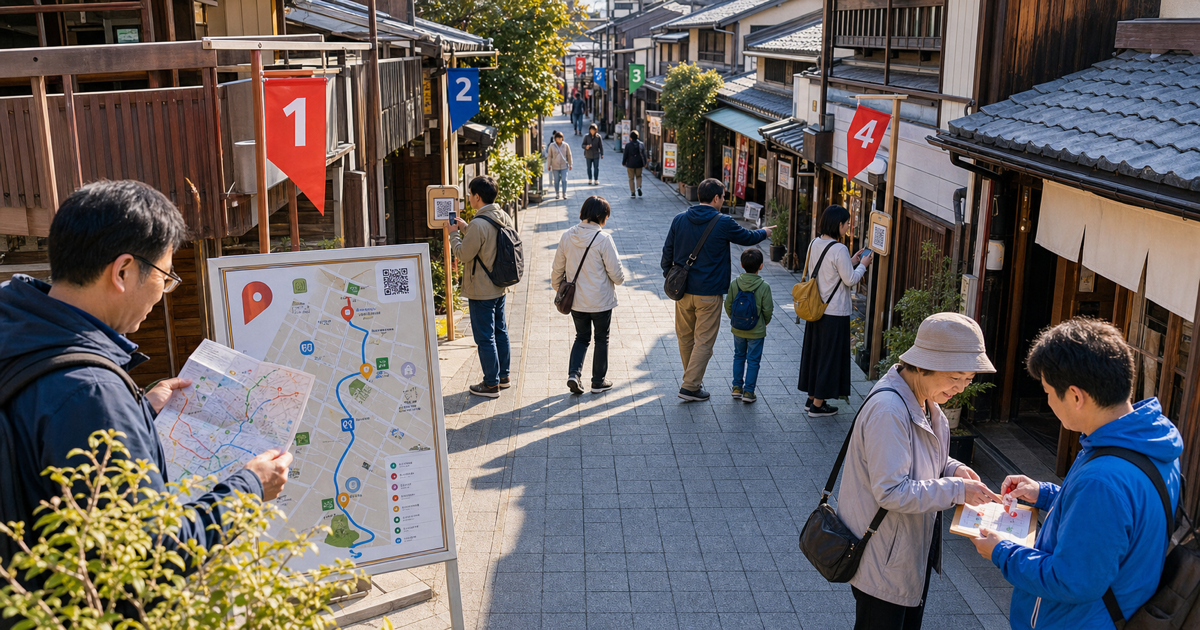
A shopping-street event opens with paper maps at reception. Within minutes, visitors ask which alley leads to stop four. One shop moved after the map was printed, and a last-minute change sent through messaging never reached every sign.
At another stop, a phone cannot scan a marker placed in the shade. A participant with no battery reaches the reward desk, where staff compare a phone screen, a paper card, and a call from the shop before deciding whether the route was completed.
If digital participation should reduce this work, decide what participants must do and what each location must confirm before deciding what the screens look like.
Putting the map on a phone does not automatically solve the event flow
"We want people to participate by phone instead of paper. But will scanning and location problems create even more questions?"
If people only need to find participating places, a clear map and place list may be enough.
If visits must be proved and a completion reward is offered, each checkpoint needs a recording method.
If eligibility changes by membership, purchased ticket, or booked route, a map alone cannot apply those rules.
Every additional feature can also add signup fields, location permission, failed scans, and reward-desk checks.
Compare the full journey from finding the first place through recording it and collecting the reward.The short answer
Use these four starting points.
- When the goal is location and opening-hour guidance, test a digital map and place list
- When visit records and rewards matter, compare existing stamp rally services that open without an app
- When repeat participation, notifications, or rankings matter, test an existing app-based service with real participants
- When membership, ticket, or booking records change eligibility, discuss a focused custom flow connected only where needed
Before comparing tools, write one participation rule.
“A first-time visitor goes to five shops, scans a marker at each shop, and receives one same-day reward after completing three.”This sentence states who participates, where they go, what gets recorded, and when the reward is given.
Write exceptions separately, including no-phone support and closed locations.
30-second check: where should your local event flow start?
Answer four questions to identify a provisional starting point: a digital map, an existing rally service, a custom flow connected to existing records, or participation-rule preparation.
The result is not a final decision.
Use it to choose what to test on site and what to ask a platform provider or development partner.
30-second check
Where should your local event participation flow start?
0/4
Answer the four questions first
Use the participant goal, venue, audience, and fallback plan to identify a sensible starting point.
If unsure, picture a first-time visitor finding the first checkpoint and collecting the reward.
Write one participant journey before choosing the tool
"Encourage people to explore the area" is not yet an operating rule.
Define these seven points for one participant.
- Who can participate
- Which places are included
- How many places count as completion
- What is recorded at each place
- Which reward is offered
- How many times one person may receive it
- Who confirms participation when a phone or connection cannot be used
Even "complete three stops" needs clarification.
Can the same stop be repeated, is any order allowed, and what happens when a shop is closed?
Do not begin with several routes, drawings, rankings, and member-only rewards at once.
Walk one route as a participant first.
Compare map-only, browser, app, and focused custom options
This table is not a ranking.
Compare options by the event goal, on-site connectivity, repeat participation, and existing records.
Prices change frequently, so they are not included.
| Representative starting point | Best suited when | Main advantage | Disadvantage or check | Plan and connection conditions | First trial |
|---|---|---|---|---|---|
Paper map + shop or staff confirmation | The area is compact, attendance is predictable, and staff can answer questions and check completion | Participation does not depend on a phone, connection, or location permission, and rules can change during an early trial | Changes are hard to apply after printing. Staff must handle lost cards, repeated marks, and reward-desk queues | Define print quantity, distribution, checkpoint materials, spare cards, and reward confirmation | Ask a small group to walk one route and record where they get lost and how long reward confirmation takes |
Google My Maps or another digital map + on-site confirmation | Participants need mobile directions, entrances, opening hours, and photos, while visit and reward rules remain simple | Share locations, descriptions, and photos in one map and update guidance after publication | Viewing a map does not prove a visit. Keep an address list and paper guidance for people who do not use maps comfortably | Confirm sharing, embedding, and editing ownership. Pair the map with paper or staff reward confirmation | Give first-time visitors both the map and place list, then test whether they can find every entrance |
Browser-based services such as furari WEB or SmartStamprally | Many participants are first-timers who need visit records and rewards without installing an app | Start from a URL or posted marker and test built-in scanning or location records, progress, and reward conditions | Browser storage, device changes, connectivity, and location permission may affect participation state. An on-site fallback is still required | Recording methods, maps, participant identity, reward limits, and event period differ by service and plan; reconfirm current conditions | At the real venue, test entry, one checkpoint, disconnection, reward exchange, and return on the same device |
App-based services such as the furari app | Repeat participants matter and the event wants to use notifications, rankings, points, or several future rallies | Repeat participants can return through one app. Some services offer notifications and support for limited offline situations | An install is required. Test whether first-time participants stop at installation, permissions, or finding the event | Browser and app editions have different features. Reconfirm which plan includes notifications, rankings, points, and recording methods | Ask a first-time participant to move from the announcement page through installation, event opening, and the first checkpoint |
Focused custom flow connected to existing records | Membership, purchased tickets, or bookings change eligibility or rewards, and staff need the result in an existing admin view | Match eligibility, visit records, rewards, and support to existing customer and event operations | Login, location, duplicate rewards, operator correction, and support all need ongoing ownership | Confirm connection methods and service terms. Do not build every route or reward in the first version | Connect one participant group, one route, one recording method, and one reward only |
What official information tells you to verify
Google says My Maps can add places and shapes, use custom colors and icons, attach photos or videos, and share the resulting map (reference).
That supports place guidance, but visit records and reward exchange remain separate decisions.
furari presents a browser-based WEB edition and an app edition as different participation methods (reference).
The WEB edition opens from a URL or posted marker without an app and supports maps, checkpoints, progress, and reward conditions (reference).
The app edition describes features for repeat use, including notifications, points, and rankings.
SmartStamprally also supports browser participation and documents several checkpoint methods, including posted-marker scans, location, quizzes, and photos (reference).
Its participant identification and map options have configuration conditions.
Check not only whether an app is required, but also how participation state is preserved and who can correct it when something fails.Choose exploration, understanding, purchase, or return as the first goal
Do not make the number of stamps the business goal by itself.
Choose one change the event should create.
- First-time visitors walk into less visible streets
- Visitors read cultural context and understand the area
- Participants see several vendors and speak with staff
- The event gives people a reason to return later
If the goal is awareness of places, the map and descriptions are the main experience.
If the goal is an on-site experience, checkpoint content and staff interaction matter as much as the record.
If the goal is return visits, decide what follows the reward.
As a practical starting point, use one goal for the first trial.
Shorten the path from announcement to the first record
At the announcement stage, participants do not know the map or platform name yet.
Test these steps as one flow.
- Open the event from a poster, social post, email, or message
- Read the date, eligibility, expected time, and reward rule
- Agree to necessary terms only when required
- Open the map or place list
- Reach the first location
- Record the visit
If identity is not required for a reward application or eligibility check, do not assume that name and email must be collected before participation starts.
When a service offers several identity methods, test device changes, a family sharing one phone, and returning later.
Choose scanning or location based on the actual venue
Each recording method fits different places.
| Recording method | Best suited place | What to test on site | Fallback confirmation |
|---|---|---|---|
| Scan a posted marker | Shops, reception desks, and exhibit rooms where the sign can be maintained | Lighting, height, dirt, rain, camera permission, and the service's in-app or browser scanner | Passphrase, staff action, spare sign, or paper mark |
| Confirm a location | Parks, landmarks, and open spaces where a permanent sign is difficult | Drift around buildings or underground, permission screens, allowed radius, and the distance between entrance and check point | On-site mark, photo, passphrase, or staff confirmation |
| Staff confirm the participant screen | Staffed reception, activities, or purchases where human interaction is part of the event | Queue time, shift changes, unavailable screens, and duplicate records | Paper reception record, participant number, or event-day list |
furari's participant FAQ notes that dirt, darkness, or camera permission can prevent scanning, and that location may be unstable underground or around tall buildings (reference).
Apple and Android also explain that apps or websites need user permission for location, and that precise or approximate location may be selectable (reference, reference).
Do not treat location alone as perfect proof of a visit.
Test at the real venue on real devices and prepare a fallback.
Put entrances and closure handling on the map, not only addresses
A correct map pin may still leave a visitor unable to find the entrance.
Give every place the same practical information.
- Use one participant-facing name everywhere
- Explain whether the entrance is on the street or inside another building
- Add a recognizable exterior photo
- State participating days and hours
- Warn about stairs, steps, or long walking segments
- Explain the replacement or completion rule when a place is closed
- Show where to ask for help
Provide the same places as a text list, in a consistent order.
People who do not use maps comfortably can still find the name and address.
Test reward handoff before celebrating completion
A completed screen does not prevent a reward-desk queue.
Test these points for one person.
- Where the completion rule is explained
- Where and when the reward desk operates
- What staff inspect to confirm completion
- How staff record that the reward was handed over
- What happens when the same completed screen is shown again
- What is displayed and offered when rewards run out
For a drawing, separate result notification and delivery information from the participation flow.
For same-day handoff, name and address may not be needed at all.
Offer the same finish to people who cannot use a phone
Some participants have poor connectivity, no battery, no usable camera, or do not want to grant location permission.
Give them another path to the same goal.
- Keep a small supply of paper maps and place lists
- Use a passphrase or staff check when a marker cannot be scanned
- Define what the reward desk may verify from the participant's event-day actions
- Provide map content in a readable text list
- Do not use color alone to distinguish complete and incomplete places
- Make controls large enough to select without precise tapping
Japan's Digital Agency describes accessibility as making information and services usable across age, disability, and use environments, and reports checks including text enlargement, contrast, reflow, and target size (reference).
The exact interaction does not have to be identical.
Provide another path that reaches the same event and the same finish.Five signs to discuss a focused custom flow
After testing an existing service, consider a focused custom flow when several of these are true.
- Purchased tickets or member groups must determine available routes
- Booked activities or event-day reception records must appear with checkpoint history
- Participation across several events must lead to later guidance or rewards
- Reward inventory, handoff, and reissue must be checked in an existing admin view
- Support staff need to correct a person's participation state within an agreed scope
One signal alone does not require custom development.
Complete a participant journey in an existing service and record exactly where it stops fitting.
Test one route, no more than five stops, and one reward
The following is a practical Ready Mock starting point, not an external standard.
- Use one participant group
- Use one route
- Use no more than five stops
- Use one main recording method
- Use one completion rule
- Use one reward
- Define one no-phone fallback
Before launch, ask people with different phones and one person using paper guidance to walk the route.
Record where they get lost and what they ask staff, not only whether they finish.
Six preparations before consultation
1. Write one participant journey in time order
List announcement, entry, finding a place, recording it, and collecting the reward.
2. Choose one event goal
Select exploration, understanding, purchase, or return as the first behavior to improve.
3. Walk the real route
Check entrances, opening hours, signal, sign placement, steps, restrooms, and rest points.
4. Test scanning and location on site
Try bright and dark places, different devices, and participation without location permission.
5. Hand over one reward
Test completion, handoff status, a second presentation, and running out of rewards.
6. Define an alternative participation method
Write where paper, a passphrase, or staff confirmation can be used.
Digital map and stamp rally consultation checklist
Select each item as you confirm it.
You can still ask for help while some items remain open.
Copyable consultation note
Use this note to discuss a digital map, an existing rally service, or a focused custom flow.
Write "confirm during consultation" for anything still unknown.
Copy a digital map and stamp rally consultation note
Use this note to discuss whether to start with a map, an existing service, or a focused custom flow. Mark unknown items for consultation.
What we want to discuss about a local event digital map or stamp rally:

Participant behavior to increase:
Example: help first-time visitors walk to shops on less visible streets

Who can participate:
Example: any event visitor, without membership or a purchased ticket

First route to test:
Example: visit five shopping-street locations in any order

How each visit is recorded:
Example: scan a posted marker at the entrance; staff provide a passphrase if scanning fails

Completion and reward rule:
Example: visit three different shops and collect one same-day reward per person

Current guidance:
Example: paper map, Instagram, LINE, shop posters, and reception staff

Current problem:
Example: visitors cannot find entrances, and reward staff compare paper and phone records manually

Fallback for connection or device problems:
Example: offer a paper map and accept a shop mark or staff confirmation under the same reward rule

What to test in an existing service:
Example: participation entry, map, one visit record, completion status, and reward exchange

What may require a focused custom flow:
Example: ticket-based eligibility and reward handoff in the existing reception view

What has been checked on site:
Example: entrances, opening hours, sign locations, signal, location accuracy, steps, and closure messages

What we want to decide:
Example: begin with a digital map or test one route in a no-install existing service

Examples we can share:
Example: current paper map, participation rules, place list, reward-desk process, and participant questions
Your next step
Choose one participating place today and walk to its entrance as a first-time visitor.
Record five points.
- Actions required to move from the announcement to the location
- How easy it is to connect the map pin with the real entrance
- Where and how the visit is recorded
- Guidance when the record fails
- Completion information available to the reward desk
If guidance alone achieves the goal, begin with a digital map.
If visit records and rewards matter, create one route in an existing browser-based service.
If membership or ticket records matter, discuss only that connection as a focused custom flow.
Further reading
- Google, My Maps overview, publication and update dates not stated on the page, accessed August 7, 2026
- Wands Co., Ltd., furari, Digital stamp rally system furari, publication and update dates not stated on the page, accessed August 7, 2026. The WEB and app editions have different features, so current plan conditions should be reconfirmed before use
- Wands Co., Ltd., furari, WEB edition digital stamp rally, publication and update dates not stated on the page, accessed August 7, 2026
- Wands Co., Ltd., furari, App edition participant FAQ, publication and update dates not stated on the page, accessed August 7, 2026
- World Wide System Corporation, SmartStamprally, publication and update dates not stated on the page, accessed August 7, 2026. Reconfirm current contract conditions for recording methods, maps, and participant identification
- Apple, Location Services and Privacy, published May 25, 2026, accessed August 7, 2026
- Google, Android Help, Choose which apps use your Android phone's location, publication and update dates not stated on the page, accessed August 7, 2026
- Digital Agency, Japan, Web accessibility statement, updated March 31, 2026, accessed August 7, 2026