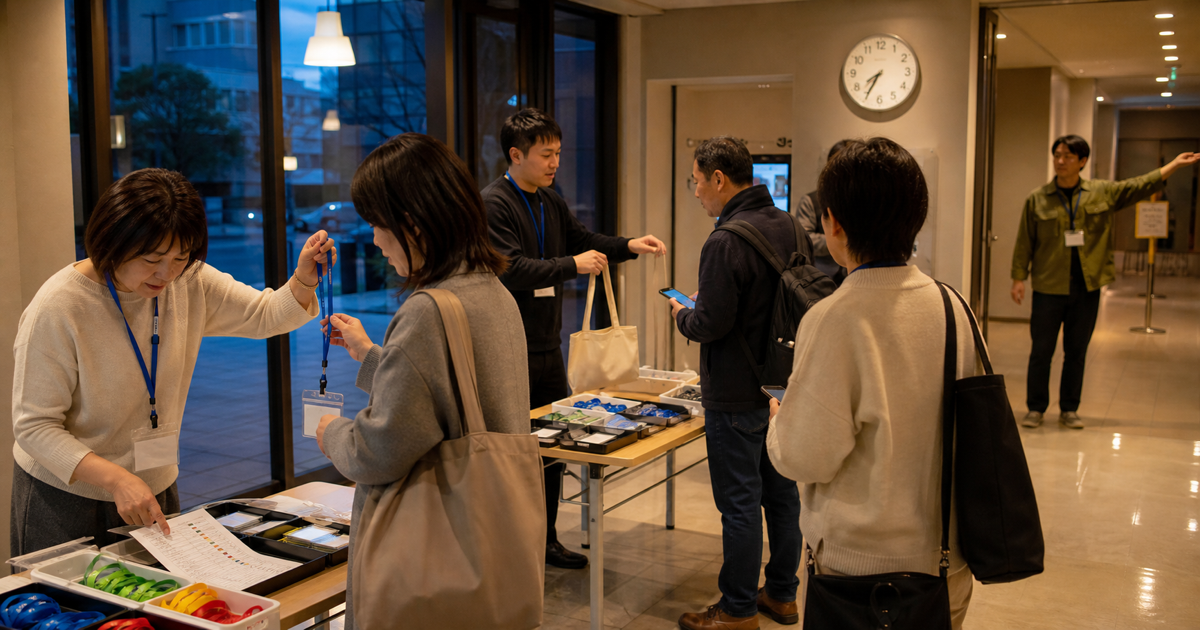
The night before an event, a LINE message asks to add one companion, while an email from someone on the waitlist arrives at almost the same time. On the event morning, staff write changes onto a paper attendee list while checking payment, handing out name badges, and answering questions at the reception table.
Meetups, community events, member workshops, and local gatherings often spread participant information across phone calls, LINE, email, forms, and paper. Right before the doors open, the team may check the same list again and again: is this person registered, did we promote the waitlist, and has this attendee already checked in?
This article helps event and community operators decide whether to prototype a small web app for registration review, attendance changes, event-day check-in, or participant list management
Why a small event tool is tempting
"We have a registration form. But can we keep handling changes and event-day check-in this way?"
Common situations include:
- A participant changes the number of companions through LINE, and staff are unsure whether the event-day list was updated.
- A cancellation arrives by phone, and the team cannot quickly see whether the waitlist was contacted.
- Email registrations are copied into both a paper reception list and a working table.
- At the reception desk, staff check name, participant type, payment, badge, materials, and companions at the same time.
- For repeated meetups, staff want to distinguish first-time attendees, returning attendees, members, and guests.
- Reception volunteers should see only the participant information needed for check-in.
This uncertainty is not just a technology problem.
Event operations combine registration, changes, check-in, and post-event review.
The useful first step is to prototype one painful workflow, not build a full event management system immediately.
The short answer
Before requesting a web app prototype for event or community operations, separate five things.
- Where registrations are received
- Who reflects attendance changes
- What reception staff must see on event day
- What participant information remains after the event
- What an existing service can handle and what needs a custom test
Start smaller. Make only the event-day reception list easier. Show only the waitlist promotion flow. Review attendance history across repeated events.
An existing event service may be enough.
But if your operation depends on member types, custom waitlist rules, repeated-event attendance history, or different visibility for staff roles, a small prototype can clarify the decision.
For a first consultation, it is enough to say, "We will keep the current registration form. We want to test only the event-day attendee list and check-in workflow first."
Prototype-friendly event moments
Do not begin with a large feature name.
Start from the moment where staff actually slow down.
| Moment to test | What happens in practice | Small screen to test | Consultation wording |
|---|---|---|---|
| Review registrations | Registrations arrive through forms, email, and LINE, and staff want one working list. | A list showing registered, checking, and waitlisted participants. | We want to test the internal review list before changing the public form. |
| Reflect attendance changes | Companions, cancellations, and waitlist replies arrive through different channels. | A screen that records the change, who reflected it, and when it was reflected. | We need to see who updated changes from LINE or email. |
| Run event-day check-in | Staff check name, participant type, payment, badge, and materials in a hurry. | A phone-friendly list that marks only checked-in status. | On event day, we only want to find names and mark check-in. |
| Manage the waitlist | When a seat opens, staff search the working table to decide who to contact next. | A list showing order received, contacted, waiting for reply, and confirmed. | We want to test only the waitlist promotion flow first. |
| Review repeated attendance | Staff distinguish first-time attendees, returning attendees, members, and guests. | A staff-only screen for attendance history and today’s participant type. | We need help with repeated attendance, not only one-off event registration. |
The table is not a plan to build everything.
It is a way to choose the first workflow where missed checks matter most.
Compare common options
There is no single best tool for every event.
Prices, fees, and plan details change often, so they are not listed here.
Compare options by fit, benefits, tradeoffs, and service conditions.
| Option | Best fit | Main benefit | Tradeoff to check | Plan and connection checks |
|---|---|---|---|---|
| Existing form and working table | Registration volume is modest, and one or two organizers can manually review changes. | Registration fields and attendee messages can be tested quickly. | Event-day check-in, waitlist work, and multi-staff ownership often remain manual. | Decide who can view form responses and who can access the working table. |
| Event management service | The team wants registration, tickets, attendee messages, and check-in in one service. | Many event-day flows are already prepared. | Member types, custom waitlist rules, and repeated attendance history may not fit. | Check free and paid event conditions, check-in app requirements, staff roles, and participant data handling. |
| Prototype only event-day check-in | Registration can stay as-is, but event-day list review and check-in need help. | The prototype focuses on the moment staff and participants feel most pressure. | Adding registration and attendee emails at the same time can make the first scope too large. | Discuss how the current form or table will provide the minimum participant information. |
| Small app for a recurring community | The event repeats, and the team wants to review members, guests, prior attendance, and follow-up. | Staff can understand ongoing relationships, not only one event’s registrations. | Keeping participant information longer requires a clear purpose and internal ownership. | If connecting email, member management, or payment tools, check each service’s conditions. |
The point is not which option is more advanced.
The point is whether the current worry can be reduced with an existing service, or whether a small prototype should test the workflow directly.
What official information changes
Existing forms can be a practical registration starting point.
Google explains that Forms can manage event registrations and show results as they come in (reference). Google also explains response summaries, individual responses, working-table review, email collection, and response receipts (reference).
This supports a simple idea: if the team only needs to receive registrations and review a list, an existing form may be enough for the first test.
Event-day check-in creates a different problem.
Peatix describes several check-in methods, including tap, QR code, name search, and paper check-in (reference). The same page recommends keeping a computer or printed attendee list as backup when using tap or QR check-in.
That points to a practical design rule: even when the screen is useful, event-day operations may still need a backup path.
Participant names, emails, phone numbers, payment status, and accessibility needs also require care.
Japan’s Personal Information Protection Commission guidance explains that the purpose of use should be as specific as possible, and it includes examples where information is collected directly through forms or application screens (reference).
For an event, this means the registration screen or attendee notice should plainly say what the information will be used for, such as registration, event-day contact, material handoff, and future announcements if applicable.
The Digital Agency’s standard guidelines explain that service and workflow reform should be considered together with information systems, and that user interfaces should be user-centered, safe, difficult to misuse, and easy to use (reference).
For reception work, that means staff should be able to mark check-in without hesitation, and participant-facing information should be separated from staff-only information.
Five decision points before prototyping
1. Do not treat registration and event-day check-in as one problem
The public form may already be enough.
The event-day list may still need its own small screen.
2. Identify where changes arrive
Attendance changes can arrive by LINE, email, or phone.
Decide who checks each channel and where the update is reflected.
3. Limit what reception staff see
Reception staff often need name, participant type, payment status, badge, and material handoff.
Showing every participant detail can make the line slower and increase privacy risk.
4. Keep a fallback for weak venue connectivity
Some venues have unreliable network conditions.
Discuss whether a paper list or another backup check should remain available.
5. Decide what remains after the event
Attendance history can help future community operations.
But unnecessary information increases the burden of managing participant data.
Decide what to keep and what to remove.
Five preparations before consultation
You do not need a finished specification.
Prepare these five items before the first consultation.
- Write three moments from the latest event where missed checks felt possible.
- Separate whether the problem happened before registration, after registration, on event day, or after the event.
- Limit the event-day reception fields to five or fewer.
- Write who may see participant information and what should remain after the event.
- Note what may already fit an existing form or event management service.
For example:
That sentence helps the conversation stay focused on the first useful prototype.
Event prototype checklist
Use this checklist to clarify the first workflow.
Unknown items can become consultation topics.
Copyable consultation note
Use this note before sending a request.
Leave unknown items blank.
Copy an event operations consultation note
Use this note to discuss where to start: registration, attendance updates, event-day check-in, or participant list review.
What we want to discuss about an event or community web app prototype:

Event or community we operate:
Example: monthly meetup, member event, local community event, small workshop

Current registration channels:
Example: Google Forms, email, LINE, phone, paper form

Current problem:
Example: changes arrive through LINE and email, and the team is unsure whether the event-day list is up to date

Event-day check-in:
Example: staff search a paper list by name, while another person confirms payment or hands out materials

Statuses we need to review:
Example: registered, waiting for payment, waitlisted, checked in, material handed out

First workflow to improve:
Example: view registrations, reflect changes, and mark event-day check-in

What an existing service may cover:
Example: registration, attendee messages, event-day check-in, simple participant list

What may need a small custom prototype:
Example: member-type check-in, waitlist promotion, attendance history across repeated events

Participant information handled:
Example: name, email, phone, participant type, payment status, companions, accessibility needs

Privacy concern:
Example: what reception staff may see, where to show the purpose of use, and what to remove after the event

What we want to decide:
Example: whether to improve the existing form first or test a small event-day check-in screen

Examples we can share:
Example: current registration form, paper attendee list, event-day reception steps, attendee message template
Your next step
Choose one moment from the next event that feels most uncertain.
Good first candidates are event-day check-in and last-minute attendance changes.
Both are visible to participants and easy for staff to recheck repeatedly.
Then summarize the request in one sentence.
That sentence makes it easier to compare an existing service with a small custom prototype.
The goal is not to add another tool.
The goal is to keep participants moving, help staff avoid hesitation, and leave only the records the team actually needs.
Further reading
- Google Workspace Learning Center, What you can do with Forms. Used to confirm event registration and response review use cases. Publication or update date not confirmed on the page. Accessed 2026-07-23.
- Google Docs Editors Help, View & manage form responses. Used to confirm response summaries, individual responses, working-table review, email collection, and response receipt options. Publication or update date not confirmed on the page. Accessed 2026-07-23.
- Peatix Help Organizer, How to check in attendees. Used to confirm tap, QR, name search, and paper check-in options, plus backup-list guidance. Publication or update date not confirmed on the page. Accessed 2026-07-23.
- Personal Information Protection Commission Japan, Guidelines on the Act on the Protection of Personal Information, General Rules. Used to confirm purpose-of-use guidance for participant information. Originally published November 2016; partially amended June 2026. Accessed 2026-07-23.
- Digital Agency Japan, Digital Society Promotion Standard Guidelines. Used for the idea of connecting service and workflow reform with information systems, and for user-centered, safe, low-error UI considerations. Page last updated 2026-07-15; DS-670.1 Usability Guidelines final revision date 2026-06-12. Accessed 2026-07-23.